JSON Reference
A jsonantt file is a single JSON object with the following top-level keys.
Top-level fields
Field |
Type |
Default |
Description |
|---|---|---|---|
|
array |
required |
Ordered list of task objects. |
|
string |
|
Chart title. Omit to render without a title and without wasting vertical whitespace. |
|
string |
|
|
|
string |
auto |
Force the x-axis start date (overrides the earliest task date). |
|
string |
auto |
Force the x-axis end date (overrides the latest task date). |
|
object |
see Style Guide |
Visual style overrides. See Style Guide for all fields. |
Task object
Each entry in tasks (and each entry in a task’s children array) is a task object.
Field |
Type |
Default |
Description |
|---|---|---|---|
|
string |
required |
Display label for the task. |
|
string |
|
Optional long description (unused in chart output, available in table columns). |
|
string |
— |
Unique identifier used in |
|
string |
— |
Start date in |
|
string |
— |
End date in |
|
string |
— |
Duration relative to |
|
string |
— |
|
|
string |
palette |
Hex color for this task’s bar or milestone marker. Children without an explicit |
|
boolean |
|
When |
|
string |
— |
The milestone date. Used only when |
Milestone field summary
Field |
Type |
Default |
Description |
|---|---|---|---|
|
boolean |
|
Render as a marker instead of a bar |
|
string |
— |
Point-in-time date for the milestone |
|
string |
style default |
Marker fill color (e.g. |
|
string |
|
Matplotlib marker: |
|
number |
|
Override marker size in points |
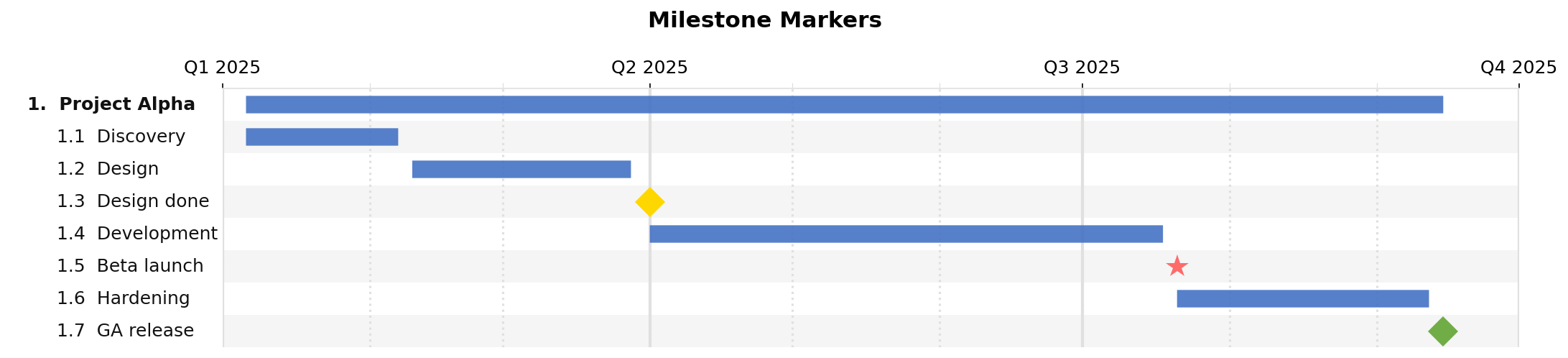
Example: milestones with different markers
{
  "title": "Milestone Markers",
  "dateformat": "%Y-%m-%d",
  "style": { "major_tick": "quarter", "minor_tick": "month" },
  "tasks": [{
    "name": "Project Alpha",
    "children": [
      { "name": "Discovery",   "start": "2025-01-06", "end": "2025-02-07" },
      { "name": "Design done", "milestone": true, "date": "2025-04-01",
        "color": "#FFD700" },
      { "name": "Development", "start": "2025-04-01", "end": "2025-07-18" },
      { "name": "Beta launch", "milestone": true, "date": "2025-07-21",
        "color": "#FF6B6B", "marker": "*", "marker_size": 16 },
      { "name": "GA release",  "milestone": true, "date": "2025-09-15",
        "color": "#70AD47" }
    ]
  }]
}
Other task fields
Field |
Type |
Default |
Description |
|---|---|---|---|
|
boolean |
|
Force bold label text on this task (independent of |
|
string |
|
Matplotlib marker symbol for milestones. |
|
number |
style default |
Override the milestone marker size in points for this task only. |
|
array |
|
Nested sub-tasks. A task with children derives its |
(any) |
any |
— |
Any additional field is stored on the task and is accessible as a table column via |
Duration units
Suffix |
Unit |
Behaviour |
|---|---|---|
|
Days |
Exact calendar days. |
|
Weeks |
7 calendar days each. |
|
Months |
Calendar months. |
|
Years |
Calendar years. |
Examples: "90d", "3m", "2w", "1y", "18m".
Duration and chaining example
{
  "title": "Duration & not_before Scheduling",
  "dateformat": "%Y-%m-%d",
  "tasks": [
    { "id": "design",   "name": "Design",
      "start": "2025-01-06", "duration": "2m", "color": "#4472C4" },
    { "id": "backend",  "name": "Backend",
      "not_before": "design", "duration": "3m", "color": "#70AD47" },
    { "id": "frontend", "name": "Frontend",
      "not_before": "design", "duration": "2m", "color": "#ED7D31" },
    { "id": "qa",       "name": "QA & Testing",
      "not_before": "backend", "duration": "6w", "color": "#FF5757" }
  ]
}

Date resolution order
jsonantt resolves each task’s start and end using the first applicable rule:
Explicit
start+end— used as-is.Duration
start+duration—endis computed.Chain
not_before+duration—startis set to the effective end of the referenced task;endis then computed.Parent — a task with no dates and no
not_before/durationderives its range from itschildren.
Minimal example
{
  "dateformat": "%Y-%m-%d",
  "tasks": [
    {
      "name": "Project",
      "children": [
        { "name": "Kick-off",  "start": "2025-01-06", "end": "2025-01-17" },
        { "name": "Delivery",  "milestone": true, "date": "2025-06-30", "color": "#FFD700" }
      ]
    }
  ]
}
Full skeleton
{
  "title": "My Project",
  "dateformat": "%Y-%m-%d",
  "start": "2025-01-01",
  "end":   "2025-12-31",
  "style": {
    "major_tick": "year",
    "minor_tick": "quarter"
  },
  "tasks": [
    {
      "id": "phase1",
      "name": "Phase 1",
      "color": "#4472C4",
      "children": [
        {
          "id": "task-a",
          "name": "Task A",
          "start": "2025-01-06",
          "duration": "6w"
        },
        {
          "id": "task-b",
          "name": "Task B",
          "not_before": "task-a",
          "duration": "2m"
        },
        {
          "name": "Phase 1 done",
          "milestone": true,
          "date": "2025-04-01",
          "color": "#FFD700"
        }
      ]
    }

  ]
}